CN100447722C - Cursor switching method in multi-display system and multi-display system - Google Patents
Cursor switching method in multi-display system and multi-display system Download PDFInfo
- Publication number
- CN100447722C CN100447722C CNB2005100930637A CN200510093063A CN100447722C CN 100447722 C CN100447722 C CN 100447722C CN B2005100930637 A CNB2005100930637 A CN B2005100930637A CN 200510093063 A CN200510093063 A CN 200510093063A CN 100447722 C CN100447722 C CN 100447722C
- Authority
- CN
- China
- Prior art keywords
- cursor
- positioning mechanism
- display
- information
- display system
- Prior art date
- Legal status (The legal status is an assumption and is not a legal conclusion. Google has not performed a legal analysis and makes no representation as to the accuracy of the status listed.)
- Expired - Lifetime
Links
Images


Landscapes
- Controls And Circuits For Display Device (AREA)
- Position Input By Displaying (AREA)
- User Interface Of Digital Computer (AREA)
Abstract
一种多显示器系统中光标切换的方法,包括:判断光标快速定位机制是否被触发;若否,对输入的信息进行正常处理;若是,则启动光标快速定位机制;接收输入的光标移动信息,并显示光标移动的提示信息,将依据提示信息进行的操作转换为光标切换信息;根据转换结果将光标发送到指定的目标显示器。一种多显示器系统,包括主机、与主机连接的多个显示器和输入设备;所述主机设置有光标快速定位机制;所述输入设备用于输入光标快速定位机制的触发信息;以及输入光标的移动信息;所述主机在光标快速定位机制被触发后,接收输入的光标移动信息,并显示光标移动的提示信息,将依据提示信息进行的操作转换为光标切换信息并控制光标在多个显示器之间的切换。
A method for switching cursors in a multi-display system, comprising: judging whether a cursor rapid positioning mechanism is triggered; if not, performing normal processing on input information; if yes, starting a cursor rapid positioning mechanism; receiving input cursor movement information, and Display the prompt information of cursor movement, convert the operation according to the prompt information into cursor switching information; send the cursor to the designated target display according to the conversion result. A multi-display system, comprising a host, a plurality of displays connected to the host, and an input device; the host is provided with a cursor quick positioning mechanism; the input device is used for inputting trigger information of the cursor quick positioning mechanism; and inputting movement of the cursor information; after the cursor rapid positioning mechanism is triggered, the host receives the input cursor movement information, and displays the prompt information of cursor movement, converts the operation according to the prompt information into cursor switching information and controls the cursor between multiple displays switch.
Description
技术领域 technical field
本发明涉及多显示器数据处理系统的控制技术,尤其是涉及一种多显示器系统中光标切换的方法及多显示器系统。The invention relates to the control technology of a multi-display data processing system, in particular to a method for switching cursors in the multi-display system and the multi-display system.
背景技术 Background technique
随着计算机及信息技术的不断发展,信息显示显得极为重要,并且日益要求在显示器上能够显示更多的信息。With the continuous development of computers and information technology, information display is extremely important, and it is increasingly required to display more information on the display.
纵观计算机的发展历史,可以发现作为计算机的一种人机接口,显示器的尺寸越来越大,从开始的14英寸、到现在的17英寸、甚至20英寸,还有用150寸以上的投影超大屏幕来做演示和讲解;分辨率也从原来的CGA、EGA到现在的高分辨率,如1024×768甚至更高;颜色也从单色到16色,256色,到现在的24位色等等,这些都意味着在显示器上能够显示更多的信息。Throughout the history of computer development, it can be found that as a human-machine interface for computers, the size of monitors is getting larger and larger, from the initial 14 inches to the current 17 inches, and even 20 inches, and there are also projections over 150 inches. The screen is used for demonstration and explanation; the resolution has also changed from the original CGA and EGA to the current high resolution, such as 1024×768 or even higher; the color has also changed from monochrome to 16-color, 256-color, to the current 24-bit color, etc. etc., these all mean that more information can be displayed on the display.
但是,因为受显示器技术的限制,大尺寸高分辨率的显示设备的成本相对比较昂贵,比如液晶、等离子体等类型的大尺寸显示器。另外,受限于目前的技术水平,单个大屏幕显示器可以观看的角度和位置是有限的。However, due to the limitation of display technology, the cost of large-size and high-resolution display devices is relatively expensive, such as large-size displays such as liquid crystals and plasmas. In addition, limited by the current technical level, the viewing angle and position of a single large-screen display are limited.
一般地,采用多个显示器显示更多的信息内容是一种既节省成本又有效提高工作效率的好方法。一方面是小尺寸的显示器成本低,而且单个小尺寸的显示器角度很容易调节,位置放置也随意。现有技术揭示了多种多显示器系统:例如,欧洲专利第EP 0827066号阐述了在ATM机上采用两个显示器的应用;英国专利第GB 2333391号阐述了如何利用两个小的显示器拼接成一个大的显示器的方法。Generally, using multiple monitors to display more information content is a good way to save costs and effectively improve work efficiency. On the one hand, the cost of a small-sized display is low, and the angle of a single small-sized display is easy to adjust, and the position is also arbitrary. The prior art discloses a variety of multi-display systems: for example, European Patent No. EP 0827066 describes the application of two displays on an ATM machine; British Patent No. GB 2333391 describes how to use two small displays to splice into one large display. display method.
此外,显示适配器也有较大的发展,动态显示和静态显示性能较强,目前在便携型计算机中采用的一般都能支持两个显示器显示不同的页面内容,在显示性能方面表现都很好。现有技术中的公开号为2000-339130的日本专利文献阐述了两个显示器应用场景,该方法收集需要在大屏幕上显示的内容,然后显示到大屏幕上去。现有技术中的美国专利第US 2004263426号解决了一个系统中不同显示模式下在两个显示设备切换显示窗口的问题。In addition, the display adapter has also developed greatly, with strong dynamic display and static display performance. Currently, the ones used in portable computers can generally support two displays to display different page content, and they all perform well in terms of display performance. The Japanese Patent Document Publication No. 2000-339130 in the prior art describes two display application scenarios. This method collects content to be displayed on a large screen and then displays it on the large screen. US Patent No. US 2004263426 in the prior art solves the problem of switching display windows between two display devices under different display modes in a system.
图1所示的是笔记本计算机连接两个外接显示器的工作方式。这种情况下,用户同时可以看到三个不同的显示器(即中间的笔记本显示器1和两边的外接显示器2和3)上的三个文件,每个文件在各自的显示器都以最佳的方式显示,因此在修改中间显示器1上显示的文件的时候,可以同时参看两边显示器2、3上的内容,以此来提高工作效率。Figure 1 shows how a notebook computer works when connected to two external monitors. In this case, the user can simultaneously see three files on three different monitors (i.e. the
现有技术中,在多个显示器多屏扩展的显示方式下,其效果相当于将显示器屏幕扩大,这样光标7可以在位置输入设备,如触控板(Track PAD)4,触控杆(Track Point)5或鼠标(Mouse)6的控制下在任意一个显示器上自由移动。In the prior art, under the multi-screen extended display mode of a plurality of displays, the effect is equivalent to enlarging the display screen, so that the cursor 7 can input devices at the position, such as a track pad (Track PAD) 4, a touch stick (Track PAD) Move freely on any display under the control of Point)5 or Mouse6.
但是,该现有技术也存在一些问题:因为存在着三个显示屏幕,如果将光标7从显示器2移到显示器3上就必须经过显示器1,光标移动的距离较远,因此需要大幅度地移动鼠标等位置输入设备,或者用手腕将鼠标抬起来回移动好几次才能完成光标的切换,而如果使用触控板和触控杆则会更为麻烦。But, there are also some problems in this prior art: because there are three display screens, if the cursor 7 is moved from the
现有技术中,美国专利第6,667,740号揭示了一种在触控板上快速移动光标的方法,该方法通过识别两个手指在触控板上的跳跃运动前后的时间和方向,使得光标快速跳动。所述方法能够在屏幕上大幅度移动光标,但是还是不足以确保光标正好跳跃到另外一个显示器上。另外该方法还存在与用户使用习惯相关的问题,且两个手指的跳跃节奏不是很好掌握。In the prior art, U.S. Patent No. 6,667,740 discloses a method for quickly moving a cursor on a touchpad, which makes the cursor jump quickly by identifying the time and direction before and after the jumping movement of two fingers on the touchpad . The method described is capable of moving the cursor on the screen substantially, but it is not sufficient to ensure that the cursor just jumps to another display. In addition, this method also has problems related to the user's usage habits, and the jumping rhythm of the two fingers is not well grasped.
此外,本专利申请的申请人联想集团提出一种采用摄像头来辅助光标在多个显示器上的定位切换的方法,该发明基于一个前提而提出:如果要在某个显示器上进行输入编辑操作,那么用户的眼睛或脸部一定要对准该显示器。所述方法可以满足大部分用户的需求,但是摄像头成本较高;而且该发明的前提使得其显然不适合一些专业人士使用,这是因为专业人士经常采用盲打输入方式:眼睛看书稿或者看另外一个屏幕,不看键盘和正在输入操作的屏幕,此时该方法就会不起作用,因此应用受到一定的限制。In addition, Lenovo Group, the applicant of this patent application, proposed a method of using a camera to assist the positioning and switching of the cursor on multiple displays. This invention is based on a premise: if you want to perform input editing operations on a certain display, then Be sure to point the user's eyes or face at the display. The method can meet the needs of most users, but the cost of the camera is relatively high; and the premise of the invention makes it obviously unsuitable for some professionals, because professionals often use touch typing input methods: reading manuscripts with eyes or reading other If you do not look at the keyboard and the screen that is being input, this method will not work at this time, so the application is subject to certain restrictions.
现有技术中,MATROX和NVIDEA等显示适配器厂家提出采用鼠标滚轮来切换多个显示器的方法。该方法操作简便,特别适合少数几个显示器放成一排或一列的时候,但是缺点是滚轮只能顺序轮换,不能随意切换,尤其是当4至5个以上显示器放置成上下两排或三排的时候,就特别不方便。In the prior art, manufacturers of display adapters such as MATROX and NVIDEA propose a method of using a mouse wheel to switch multiple displays. This method is easy to operate, especially suitable for a few monitors placed in a row or column, but the disadvantage is that the scroll wheel can only be rotated sequentially, and cannot be switched at will, especially when more than 4 to 5 monitors are placed in two or three rows. Sometimes, it is very inconvenient.
综上所述,现有技术的多显示器系统中光标切换的方法存在缺陷:例如,在多个显示器上移动切换的时候,存在着比较大的障碍,使得操作者在使用的时候感觉非常的不方便,严重的时候会导致操作者胳膊酸痛以至职业病;再如,操作者在使用时感觉较为不方便,影响工作效率。To sum up, there are defects in the method of cursor switching in the multi-display system of the prior art: for example, when moving and switching on multiple displays, there are relatively large obstacles, which makes the operator feel very uncomfortable when using it. It is convenient, and in severe cases, it will cause sore arms of the operator and even occupational diseases; another example, the operator feels more inconvenient when using it, which affects work efficiency.
发明内容 Contents of the invention
针对现有技术的不足,本发明解决的技术问题在于提供一种多显示器系统中光标切换的方法及多显示器系统,其操作简单,可以快速进行光标在不同显示器之间的切换,从而提高工作效率。Aiming at the deficiencies of the prior art, the technical problem solved by the present invention is to provide a method for switching cursors in a multi-display system and a multi-display system, which are easy to operate and can quickly switch the cursor between different displays, thereby improving work efficiency .
为此,本发明解决技术问题的技术方案是:提供一种多显示器系统中光标切换的方法,包括步骤:For this reason, the technical scheme that the present invention solves technical problem is: provide a kind of method of cursor switching in the multi-display system, comprise steps:
1)判断光标快速定位机制是否被触发;如果是,则启动光标快速定位机制,进入步骤2);如果否,则进入步骤4);1) Judging whether the cursor quick positioning mechanism is triggered; if yes, then start the cursor quick positioning mechanism, and enter step 2); if not, then enter step 4);
2)接收输入的光标移动信息,并显示光标移动的提示信息,将依据提示信息进行的操作转换为光标切换信息;2) Receive the input cursor movement information, and display the prompt information of cursor movement, and convert the operation according to the prompt information into cursor switching information;
3)根据前述转换结果将光标发送到指定的目标显示器;3) sending the cursor to the designated target display according to the aforementioned conversion result;
4)对输入的信息进行正常处理。4) Perform normal processing on the input information.
优选地,所述提示信息包括:在现有光标位置处的对话窗口,该对话窗口上显示多显示器系统中显示器的排列;在每个显示器上显示各自的显示器号码,并且在对话窗口上显示各显示器号码;优选地,所述步骤1)的触发的方式包括:操作在输入设备设置的光标快速定位机制触发部件和/或按预定方式操作输入设备。Preferably, the prompt information includes: a dialogue window at the current cursor position, the dialogue window displays the arrangement of the displays in the multi-display system; displays the respective display numbers on each display, and displays each Display number; Preferably, the triggering method of step 1) includes: operating the cursor quick positioning mechanism trigger component set on the input device and/or operating the input device in a predetermined manner.
优选地,所述光标快速定位机制触发部件是鼠标、触控板或键盘上的新增按键、现有按键的组合;所述预定方式包括:触控板或触控杆特定的手指运动模式、触控板的特定位置。Preferably, the triggering component of the cursor quick positioning mechanism is a combination of a new key and an existing key on a mouse, a touch pad or a keyboard; A specific location for the trackpad.
优选地,所述步骤2)的转换包括:将输入设备的移动预定数目的单位格作为光标在显示器切换的一格。Preferably, the conversion in step 2) includes: taking the movement of the input device by a predetermined number of units as a grid for the cursor to switch on the display.
本发明还提供一种多显示器系统,包括主机、与主机连接的多个显示器和输入设备;The present invention also provides a multi-display system, including a host, multiple displays connected to the host, and input devices;
所述主机设置有光标快速定位机制;The host is provided with a cursor quick positioning mechanism;
所述输入设备用于输入光标快速定位机制的触发信息;以及输入光标的移动信息;The input device is used to input the trigger information of the cursor fast positioning mechanism; and input the movement information of the cursor;
所述主机在光标快速定位机制被触发后,接收输入的光标移动信息,并显示光标移动的提示信息,将依据提示信息进行的操作转换为光标切换信息,并控制光标在多个显示器之间的切换。After the cursor fast positioning mechanism is triggered, the host computer receives the input cursor movement information, displays the prompt information of the cursor movement, converts the operation according to the prompt information into cursor switching information, and controls the movement of the cursor between multiple displays. switch.
优选地,所述主机包括:Preferably, the host includes:
光标快速定制机制启动单元,用于在输入设备输入光标快速定位机制的触发信息时启动光标快速定位机制;A quick cursor customization mechanism starting unit, configured to start the cursor quick positioning mechanism when the input device inputs the trigger information of the cursor quick positioning mechanism;
光标控制单元,用于实现对光标位置的控制,当光标快速定位机制被启动后,其按照快速定位机制来处理输入设备输入的光标移动信息;当该光标快速定位机制被释放后,则恢复正常工作方式。The cursor control unit is used to control the position of the cursor. When the cursor fast positioning mechanism is activated, it processes the cursor movement information input by the input device according to the fast cursor positioning mechanism; when the cursor fast positioning mechanism is released, it returns to normal Way of working.
优选地,所述主机还包括:光标快速定位提示单元,用于在光标快速定位机制被启动后显示各显示器的信息以及光标移动的提示信息。Preferably, the host computer further includes: a quick cursor positioning prompt unit, configured to display information of each display and prompt information of cursor movement after the quick cursor positioning mechanism is activated.
优选地,所述输入设备设置有光标快速定位机制触发部件。Preferably, the input device is provided with a quick cursor positioning mechanism triggering component.
优选地,所述光标快速定位机制触发部件是鼠标、触控板或键盘上的新增按键、现有按键的组合。Preferably, the triggering component of the cursor quick positioning mechanism is a combination of newly added keys and existing keys on the mouse, touch pad or keyboard.
相对于现有技术,本发明的有益效果是:由于本发明的多显示器系统设置有光标快速定位机制,并且通过输入设备来触发该快速定位机制,从而在触发光标快速定位机制后,多显示器系统的光标控制部分只需要执行相对简单的动作,即可将光标移动到目标显示器上去,因此可以采用输入设备随意切换光标在各个显示器上的移动,并将光标快速定位到某个显示器上,从而可以提高多显示器扩展显示模式下的工作效率,尤其是光标在各个显示器之间移动的效率;适用面广,可以适用于各种带多个显示装置的PC,笔记本和工作站,电视机等;可以减少因频繁大幅度移动鼠标而因此职业病的机会。Compared with the prior art, the beneficial effects of the present invention are: since the multi-display system of the present invention is provided with a cursor quick positioning mechanism, and the quick positioning mechanism is triggered by an input device, after triggering the cursor quick positioning mechanism, the multi-display system The cursor control part only needs to perform relatively simple actions to move the cursor to the target display. Therefore, the input device can be used to switch the movement of the cursor on each display at will, and the cursor can be quickly positioned on a certain display. Improve the work efficiency in multi-monitor extended display mode, especially the efficiency of the cursor moving between the various monitors; it has a wide range of applications, and can be applied to various PCs, notebooks, workstations, TVs, etc. with multiple display devices; it can reduce Chances of occupational disease due to frequent and large mouse movements.
本发明的带来额外的好处是,当触发快速定位机制时,用户可以很容易发现光标的当前位置,这样就不需要用户去来回晃动鼠标来寻找当前光标的位置。The additional advantage of the present invention is that when the quick positioning mechanism is triggered, the user can easily find the current position of the cursor, so that the user does not need to shake the mouse back and forth to find the current position of the cursor.
附图说明 Description of drawings
图1是笔记本计算机连接两个外接显示器的工作方式;Figure 1 is the working method of connecting two external monitors to a notebook computer;
图2是本发明的多显示器系统的示意图;2 is a schematic diagram of a multi-display system of the present invention;
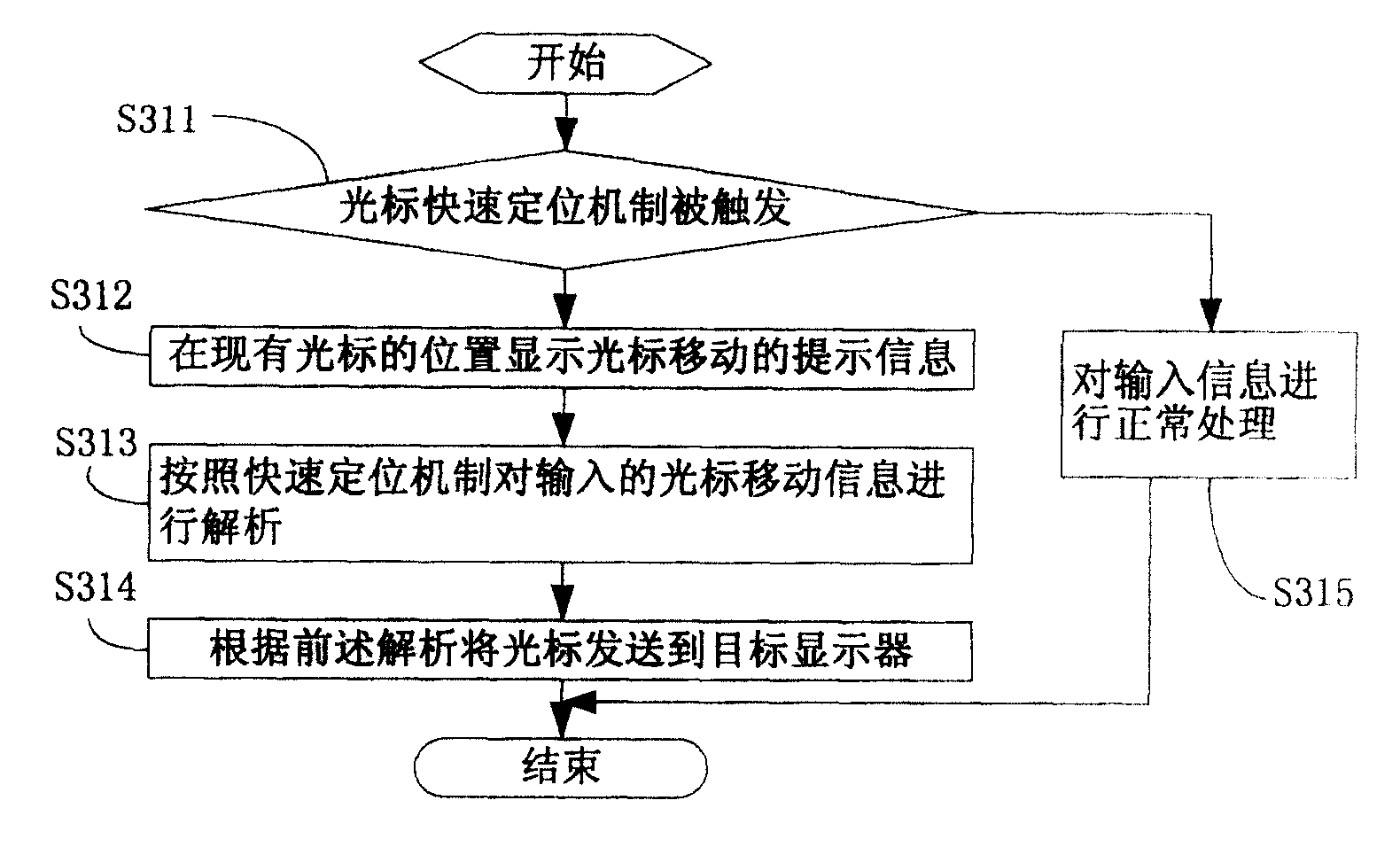
图3是本发明的多显示器系统中光标切换的方法的流程图;Fig. 3 is the flowchart of the method for cursor switching in the multi-display system of the present invention;
图4是本发明一实施例中光标快速定位机制被触发时的提示窗口示意图;Fig. 4 is a schematic diagram of a prompt window when the cursor quick positioning mechanism is triggered in an embodiment of the present invention;
图5是本发明一实施例中触发部件的示意图。Fig. 5 is a schematic diagram of a trigger component in an embodiment of the present invention.
具体实施方式 Detailed ways
本发明的主要思路是:在多显示器系统中设置光标快速定位机制,当触发光标快速定位机制后,多显示器系统的光标控制部分只需要执行相对简单的动作和相对短的移动距离,即可将光标移动到目标显示器上去,当释放该光标快速定位机制后,光标控制部分恢复正常工作方式。The main idea of the present invention is: set the cursor fast positioning mechanism in the multi-display system, when the cursor fast positioning mechanism is triggered, the cursor control part of the multi-display system only needs to perform relatively simple actions and a relatively short moving distance to move The cursor moves to the target display, and when the cursor quick positioning mechanism is released, the cursor control part returns to the normal working mode.
其中,光标快速定位机制可以通过多种方式被触发,例如在多显示器系统的输入部分设置触发单元,包括但不限于按键、组合按键方式、软件按键按钮、触控板的特殊部位、触控板上或触控杆上特殊的按法等。Among them, the cursor rapid positioning mechanism can be triggered in various ways, such as setting a trigger unit in the input part of the multi-display system, including but not limited to buttons, combined button methods, software button buttons, special parts of the touchpad, touchpad special clicks on the touch stick, etc.
请参阅图2,是本发明的多显示器系统的示意图。Please refer to FIG. 2 , which is a schematic diagram of the multi-display system of the present invention.
多显示器系统包括主机210、与主机连接的多个显示器220和输入设备230。该多显示器系统设置有光标快速定位机制,用于完成光标在多个显示器之间的快速切换。The multi-display system includes a host 210 , a plurality of displays 220 and an input device 230 connected to the host. The multi-monitor system is provided with a quick cursor positioning mechanism for fast switching of the cursor between multiple monitors.
输入设备230用于输入光标快速定位机制的触发信息,触发在多个显示器220之间进行光标切换的快速定位机制;以及用于输入光标的移动信息。The input device 230 is used for inputting the trigger information of the quick cursor positioning mechanism, triggering the quick positioning mechanism for switching the cursor between multiple displays 220 ; and for inputting the movement information of the cursor.
该输入设备230可以通过多种方式来触发光标快速定位机制。例如,该输入设备230设置有光标快速定位机制触发部件231。The input device 230 can trigger the cursor quick positioning mechanism in various ways. For example, the input device 230 is provided with a quick cursor positioning mechanism triggering part 231 .
光标快速定位机制触发部件231可以是鼠标、触控板或键盘上的新增按键、现有按键的组合(图未示)等,当用户操作该触发部件231时,快速定位机制被触发。The cursor quick positioning mechanism triggering part 231 can be a new key on the mouse, a touchpad or a keyboard, a combination of existing keys (not shown), etc. When the user operates the triggering part 231, the quick positioning mechanism is triggered.
此外,所述光标快速定位机制还可以通过其他的方式被触发,例如是触控板或触控杆特定的手指运动模式、触控板的特定位置等等。In addition, the cursor quick positioning mechanism may also be triggered in other ways, for example, a specific finger movement pattern of the touchpad or a touchstick, a specific position of the touchpad, and the like.
所述主机210包括光标快速定制机制启动单元211和光标控制单元212。The host 210 includes a quick cursor customization mechanism starting unit 211 and a cursor control unit 212 .
所述光标快速定制机制启动单元211用于在输入设备230输入光标快速定位机制的触发信息时启动光标快速定位机制。The quick cursor customization mechanism starting unit 211 is configured to start the quick cursor positioning mechanism when the input device 230 inputs trigger information of the quick cursor positioning mechanism.
所述光标控制单元212用于实现对光标位置的控制,当光标快速定位机制被启动后,其按照快速定位机制来处理输入设备230输入的光标移动信息;当该光标快速定位机制被释放后,则恢复正常工作方式。The cursor control unit 212 is used to control the position of the cursor. When the cursor quick positioning mechanism is started, it processes the cursor movement information input by the input device 230 according to the quick cursor positioning mechanism; when the cursor quick positioning mechanism is released, Then resume the normal working mode.
此外,所述主机210还包括光标快速定位提示单元213,用于在光标快速定位机制被启动后显示各显示器220的信息以及光标移动的提示信息,方便用户的操作。In addition, the host 210 also includes a quick cursor positioning prompt unit 213 for displaying the information of each display 220 and the prompt information of cursor movement after the quick cursor positioning mechanism is activated, so as to facilitate the user's operation.
请参阅图3,是本发明的多显示器系统中光标切换的方法的流程图。Please refer to FIG. 3 , which is a flow chart of the cursor switching method in the multi-display system of the present invention.
步骤S311,判断光标快速定位机制是否被触发;如果是,则启动光标快速定位机制,进入步骤S312;如果否,则进入步骤S315。Step S311 , judging whether the cursor quick positioning mechanism is triggered; if yes, start the cursor quick positioning mechanism, and go to step S312 ; if not, go to step S315 .
可以通过多种方式来触发光标快速定位机制。例如,在输入设备设置有光标快速定位机制触发部件。The cursor quick positioning mechanism can be triggered in various ways. For example, the input device is provided with a quick cursor positioning mechanism triggering component.
光标快速定位机制触发部件可以是鼠标、触控板或键盘上的新增按键、现有按键的组合(图未示)等,当用户操作该触发部件时,快速定位机制被触发。The triggering part of the cursor rapid positioning mechanism can be a new key on the mouse, a touch panel or a keyboard, a combination of existing keys (not shown), etc. When the user operates the triggering part, the rapid positioning mechanism is triggered.
此外,所述光标快速定位机制还可以通过其他的方式被触发,例如是触控板或触控杆特定的手指运动模式、触控板的特定位置等等。In addition, the cursor quick positioning mechanism may also be triggered in other ways, for example, a specific finger movement pattern of the touchpad or a touchstick, a specific position of the touchpad, and the like.
步骤S312,在现有光标的位置显示光标移动的提示信息。Step S312, displaying prompt information of cursor movement at the position of the existing cursor.
请一并参阅图4,当光标快速定位机制被触发时,在目前光标所在位置旁边弹出一个小对话窗口,该对话窗口上显示多显示器系统中显示器的排列,分别对应实际的显示器。Please also refer to FIG. 4. When the cursor quick positioning mechanism is triggered, a small dialogue window pops up next to the current cursor position. The dialogue window displays the arrangement of the monitors in the multi-monitor system, corresponding to the actual monitors respectively.
为明显区别,可以在每个显示器上显示各自的显示器号码,并且在窗口上也显示,在窗口上显示一个缩小的所有显示器的排列图。In order to distinguish clearly, the individual display number can be displayed on each display, and it can also be displayed on the window, and a reduced arrangement diagram of all the displays can be displayed on the window.
步骤S313,接收输入的光标移动信息,将依据提示信息进行的操作转换为光标切换信息。Step S313, receiving the input cursor movement information, and converting the operation performed according to the prompt information into cursor switching information.
参阅图4,用户通过光标在该对话窗口上选择显示器,点击即可将光标输送进入到指定的显示器上。Referring to FIG. 4 , the user selects a display on the dialog window through the cursor, and clicks to transfer the cursor to the designated display.
步骤S314,根据前述转换结果将光标发送到指定的目标显示器。Step S314, sending the cursor to the designated target display according to the aforementioned conversion result.
步骤S315,多显示器系统对输入信息进行正常处理。In step S315, the multi-monitor system normally processes the input information.
需要说明的是,在光标快速定位机制被触发时,还可以采用其他类似的方式来处理光标移动信息。例如,将输入设备的移动一个单位或少量几个单位格,作为显示器切换的一格,被选中的显示器上显著显示表示被选中。或者把光标显著显示,比如光标放大,光标闪烁,光标中包含显目的所在显示器的编号等。It should be noted that, when the cursor quick positioning mechanism is triggered, other similar methods may also be used to process the cursor movement information. For example, moving the input device by one unit or a small number of units is used as one grid for display switching, and a prominent display on the selected display indicates that it is selected. Or display the cursor prominently, for example, the cursor is enlarged, the cursor is blinking, and the cursor contains the serial number of the display where the prominent object is located.
把光标发送到指定的目标显示器上,是现有技术,只需要把目标显示器的坐标位置告诉操作系统,然后让操作系统在该显示器坐标范围内显示光标即可。而把原有位置上的光标隐去即可。另外的做法也可以是通知操作系统把光标移动一定的距离。Sending the cursor to the specified target display is an existing technology, and only needs to tell the operating system the coordinate position of the target display, and then let the operating system display the cursor within the coordinate range of the display. Just hide the cursor at the original position. Another approach can also be to inform the operating system to move the cursor a certain distance.
为便于对本发明的理解,下面结合实施例对本发明进行详细的描述。In order to facilitate understanding of the present invention, the present invention will be described in detail below in conjunction with examples.
实施例一Embodiment one
请参阅图5,在鼠标510上设置一个光标快速定位键511。Referring to FIG. 5 , a cursor
以右手鼠标为例,光标快速定位键511设置在鼠标体侧的大拇指位置附近。当大拇指按住该按键时,光标快速定位机制触发;当松开该按键,则窗口消失,鼠标操作恢复正常。Taking a right-handed mouse as an example, the cursor
实施例二Embodiment two
在实施例二中,在触控板附近设置快速定位按键(图未示)。In the second embodiment, a quick positioning button (not shown) is set near the touch panel.
实施例三Embodiment three
在触控杆按钮附近设置该快速定位键(图未示),来实现光标的快速移动。The quick positioning key (not shown) is set near the button of the touch stick to realize the quick movement of the cursor.
实施例四Embodiment four
在实施例四中,在键盘上设置一个按键,或选用一个热键(图未示)。In the fourth embodiment, a key is set on the keyboard, or a hot key (not shown) is selected.
实施例五Embodiment five
在实施例五中,在触控板上采用特定的位置作为触发条件,选定触控板的底部中间位置,作为触发特征,当手指触碰到该位置时,快速移动窗口在光标附近弹出。当光标选中某个显示器窗口点击后,快速移动窗口消失,光标移动到目标显示器上。然后触控板恢复正常操作。In the fifth embodiment, a specific position is used as the trigger condition on the touch panel, and the middle position of the bottom of the touch panel is selected as the trigger feature. When the finger touches this position, the fast moving window pops up near the cursor. When the cursor selects a display window and clicks, the fast moving window disappears and the cursor moves to the target display. The touchpad then resumes normal operation.
实施例六Embodiment six
在实施例六中,在触控板上采用特定的手指手势动作作为触发条件,该触发条件为:在触控板上在规定时间内按照顺时针方向快速划一个圆圈。当触控板驱动程序检测到该手势时,触发该快速定位机制。In the sixth embodiment, a specific finger gesture action is used as a trigger condition on the touch panel, and the trigger condition is: quickly draw a circle clockwise on the touch panel within a specified time. When the touchpad driver detects this gesture, it triggers the quick pointing mechanism.
实施例七Embodiment seven
在实施例七中,快速连击触控板的右键作为触发条件。In the seventh embodiment, a quick double click on the right button of the touch panel is used as a trigger condition.
以上所述仅是本发明的优选实施方式,应当指出,对于本技术领域的普通技术人员来说,在不脱离本发明原理的前提下,还可以做出若干改进和润饰,这些改进和润饰也应视为本发明的保护范围。The above is only a preferred embodiment of the present invention, it should be pointed out that, for those of ordinary skill in the art, without departing from the principle of the present invention, some improvements and modifications can also be made, and these improvements and modifications can also be made. It should be regarded as the protection scope of the present invention.
Claims (10)
Priority Applications (1)
| Application Number | Priority Date | Filing Date | Title |
|---|---|---|---|
| CNB2005100930637A CN100447722C (en) | 2005-08-25 | 2005-08-25 | Cursor switching method in multi-display system and multi-display system |
Applications Claiming Priority (1)
| Application Number | Priority Date | Filing Date | Title |
|---|---|---|---|
| CNB2005100930637A CN100447722C (en) | 2005-08-25 | 2005-08-25 | Cursor switching method in multi-display system and multi-display system |
Publications (2)
| Publication Number | Publication Date |
|---|---|
| CN1920757A CN1920757A (en) | 2007-02-28 |
| CN100447722C true CN100447722C (en) | 2008-12-31 |
Family
ID=37778489
Family Applications (1)
| Application Number | Title | Priority Date | Filing Date |
|---|---|---|---|
| CNB2005100930637A Expired - Lifetime CN100447722C (en) | 2005-08-25 | 2005-08-25 | Cursor switching method in multi-display system and multi-display system |
Country Status (1)
| Country | Link |
|---|---|
| CN (1) | CN100447722C (en) |
Families Citing this family (13)
| Publication number | Priority date | Publication date | Assignee | Title |
|---|---|---|---|---|
| CN101533314B (en) * | 2008-03-11 | 2011-11-02 | 联想(北京)有限公司 | Method for positioning terminal by cursor, system thereof and terminal controller |
| US10191869B2 (en) * | 2014-10-20 | 2019-01-29 | Logitech Europe S.A. | Input device with multi-host switching |
| CN104461320B (en) * | 2014-12-03 | 2017-11-24 | 合肥联宝信息技术有限公司 | A kind of method and device that double mouse pointers are shown on computer computer double screen |
| CN105929954B (en) * | 2016-04-19 | 2019-10-18 | 京东方科技集团股份有限公司 | Method and device for controlling cursor, and display device |
| CN106293160B (en) * | 2016-09-08 | 2019-12-31 | 青岛海信电器股份有限公司 | Method and device for switching mouse pointers among multiple displays |
| CN107193366A (en) * | 2017-04-01 | 2017-09-22 | 邓伟娜 | A kind of keyboard/mouse automatic switching method and device, a kind of computer system |
| CN107391005B (en) * | 2017-06-22 | 2020-11-20 | 歌尔光学科技有限公司 | Method for controlling cursor movement on host screen, gamepad |
| CN108762603A (en) * | 2018-03-30 | 2018-11-06 | 联想(北京)有限公司 | A kind of display methods and electronic equipment |
| CN110389672B (en) * | 2018-04-13 | 2024-02-02 | 锋厚科技股份有限公司 | KVM system |
| CN108920118A (en) * | 2018-06-29 | 2018-11-30 | 联想(北京)有限公司 | Display methods, device and system |
| CN112130716B (en) * | 2019-06-24 | 2024-12-31 | 锋厚科技股份有限公司 | KVM switch device and KVM switch system |
| CN111708446B (en) * | 2020-06-22 | 2024-01-30 | 重庆紫光华山智安科技有限公司 | Mouse roaming method, system, electronic equipment and storage medium |
| CN114153348B (en) * | 2020-09-04 | 2025-03-18 | 华为终端有限公司 | Cursor prompt method and host |
Citations (7)
| Publication number | Priority date | Publication date | Assignee | Title |
|---|---|---|---|---|
| JPH0713531A (en) * | 1993-06-28 | 1995-01-17 | Toshiba Corp | Display control system having display mode switching function |
| EP0827066A2 (en) * | 1996-08-30 | 1998-03-04 | NCR International, Inc. | Multi-display computer system |
| GB2333391A (en) * | 1998-01-20 | 1999-07-21 | Samsung Display Devices Co Ltd | Multi-display monitor |
| US6069615A (en) * | 1996-08-19 | 2000-05-30 | International Business Machines Corporation | Single pointing device/keyboard for multiple computers |
| CN1256456A (en) * | 1998-12-01 | 2000-06-14 | 国际商业机器公司 | Interface control for switching between display spaces of display |
| CN1307779A (en) * | 1997-07-21 | 2001-08-08 | 三星电子株式会社 | TV GUI with cursor position indicator |
| CN1622619A (en) * | 2004-12-24 | 2005-06-01 | 北京中星微电子有限公司 | A multi-screen display method and device |
-
2005
- 2005-08-25 CN CNB2005100930637A patent/CN100447722C/en not_active Expired - Lifetime
Patent Citations (7)
| Publication number | Priority date | Publication date | Assignee | Title |
|---|---|---|---|---|
| JPH0713531A (en) * | 1993-06-28 | 1995-01-17 | Toshiba Corp | Display control system having display mode switching function |
| US6069615A (en) * | 1996-08-19 | 2000-05-30 | International Business Machines Corporation | Single pointing device/keyboard for multiple computers |
| EP0827066A2 (en) * | 1996-08-30 | 1998-03-04 | NCR International, Inc. | Multi-display computer system |
| CN1307779A (en) * | 1997-07-21 | 2001-08-08 | 三星电子株式会社 | TV GUI with cursor position indicator |
| GB2333391A (en) * | 1998-01-20 | 1999-07-21 | Samsung Display Devices Co Ltd | Multi-display monitor |
| CN1256456A (en) * | 1998-12-01 | 2000-06-14 | 国际商业机器公司 | Interface control for switching between display spaces of display |
| CN1622619A (en) * | 2004-12-24 | 2005-06-01 | 北京中星微电子有限公司 | A multi-screen display method and device |
Also Published As
| Publication number | Publication date |
|---|---|
| CN1920757A (en) | 2007-02-28 |
Similar Documents
| Publication | Publication Date | Title |
|---|---|---|
| US6958749B1 (en) | Apparatus and method for manipulating a touch-sensitive display panel | |
| JP5691464B2 (en) | Information processing device | |
| JP3630153B2 (en) | Information display input device, information display input method, and information processing device | |
| US11157094B2 (en) | Touch input switching for multi-form factor information handling system (IHS) | |
| TWI413922B (en) | Control method for touchpad and touch device using the same | |
| US9977594B2 (en) | Keyboard having touch screen mounted thereon, control method therefor, and method for controlling computing device using keyboard | |
| JP4789232B2 (en) | Information processing apparatus and input operation mode control method | |
| JP2010218422A (en) | Information processing apparatus and method for controlling the same | |
| US12314563B2 (en) | Virtual keyboard processing method and related device | |
| JP2012208962A (en) | Arrangement of virtual input device onto touch screen type user interface | |
| US20130063385A1 (en) | Portable information terminal and method for controlling same | |
| CN104423836B (en) | information processing device | |
| CN100447722C (en) | Cursor switching method in multi-display system and multi-display system | |
| JP2009151718A (en) | Information processing apparatus and display control method | |
| CN102609184A (en) | Method and apparatus for providing mouse right click function in touch screen terminal | |
| CN110633044B (en) | Control method, control device, electronic equipment and storage medium | |
| US20230359279A1 (en) | Feedback method and related device | |
| JP5197533B2 (en) | Information processing apparatus and display control method | |
| WO2022143198A1 (en) | Processing method for application interface, and related device | |
| US20150062015A1 (en) | Information processor, control method and program | |
| JP4771181B2 (en) | Information processing apparatus, input operation mode control method, and program used for information processing apparatus | |
| CN114690888B (en) | A method for processing an application interface and related equipment | |
| US20160147321A1 (en) | Portable electronic device | |
| JP2011054213A (en) | Information processor and control method | |
| JPH10198505A (en) | Personal computer equipment |
Legal Events
| Date | Code | Title | Description |
|---|---|---|---|
| C06 | Publication | ||
| PB01 | Publication | ||
| C10 | Entry into substantive examination | ||
| SE01 | Entry into force of request for substantive examination | ||
| C14 | Grant of patent or utility model | ||
| GR01 | Patent grant | ||
| CX01 | Expiry of patent term | ||
| CX01 | Expiry of patent term |
Granted publication date: 20081231 |