Join the ServiceStack Google+ Community or follow @ServiceStack for updates.
Redis Connection strings have been expanded to support the more versatile URI format which is now able to capture most of Redis Client settings in a single connection string (akin to DB Connection strings).
Redis Connection Strings supports multiple URI-like formats, from a simple hostname or IP Address and port pair to a fully-qualified URI with multiple options specified on the QueryString.
Some examples of supported formats:
localhost
127.0.0.1:6379
redis://localhost:6379
password@localhost:6379
clientid:password@localhost:6379
redis://clientid:password@localhost:6380?ssl=true&db=1
More examples can be seen in ConfigTests.cs
Any additional configuration can be specified as QueryString parameters. The full list of options that can be specified include:
| Ssl | bool | If this is an SSL connection |
| Db | int | The Redis DB this connection should be set to |
| Client | string | A text alias to specify for this connection for analytic purposes |
| Password | string | UrlEncoded version of the Password for this connection |
| ConnectTimeout | int | Timeout in ms for making a TCP Socket connection |
| SendTimeout | int | Timeout in ms for making a synchronous TCP Socket Send |
| ReceiveTimeout | int | Timeout in ms for waiting for a synchronous TCP Socket Receive |
| IdleTimeOutSecs | int | Timeout in Seconds for an Idle connection to be considered active |
| NamespacePrefix | string | Use a custom prefix for ServiceStack.Redis internal index colletions |
PM> Install-Package ServiceStack.Redis
Latest v4+ on NuGet is a commercial release with free quotas.
ServiceStack.Redis has great support AWS's ElastiCache Redis solution, follow this guide to help getting up and running quickly:
The recommended way to access RedisClient instances is to use one of the available Thread-Safe Client Managers below. Client Managers are connection factories which is ideally registered as a Singleton either in your IOC or static classes.
With the enhanced Redis URI Connection Strings we've been able to simplify and streamline the existing PooledRedisClientManager implementation and have extracted it out into a new clients manager called RedisManagerPool.
In addition to removing all above options on the Client Manager itself, readonly connection strings have also been removed so the configuration ends up much simpler and more aligned with the common use-case:
container.Register<IRedisClientsManager>(c =>
    new RedisManagerPool(redisConnectionString));
Pooling Behavior
Any connections required after the maximum Pool size has been reached will be created and disposed outside of the Pool. By not being restricted to a maximum pool size, the pooling behavior in RedisManagerPool can maintain a smaller connection pool size at the cost of potentially having a higher opened/closed connection count.
If you prefer to define options on the Client Manager itself or you want to provide separate Read/Write and ReadOnly
(i.e. Master and Slave) redis-servers, use the PooledRedisClientManager instead:
container.Register<IRedisClientsManager>(c =>
    new PooledRedisClientManager(redisReadWriteHosts, redisReadOnlyHosts) {
        ConnectTimeout = 100,
        //...
    });
Pooling Behavior
The PooledRedisClientManager imposes a maximum connection limit and when its maximum pool size has been reached will instead block on any new connection requests until the next RedisClient is released back into the pool. If no client became available within PoolTimeout, a Pool TimeoutException will be thrown.
If don't want to use connection pooling (i.e. your accessing a local redis-server instance) you can use a basic (non-pooled) Clients Manager which creates a new RedisClient instance each time:
container.Register<IRedisClientsManager>(c =>
new BasicRedisClientManager(redisConnectionString));Once registered, accessing the RedisClient is the same in all Client Managers, e.g:
var clientsManager = container.Resolve<IRedisClientsManager>();
using (IRedisClient redis = clientsManager.GetClient())
{
    redis.IncrementValue("counter");
    List<string> days = redis.GetAllItemsFromList("days");

    //Access Typed API
    var redisTodos = redis.As<Todo>();

    redisTodos.Store(new Todo {
        Id = redisTodos.GetNextSequence(),
        Content = "Learn Redis",
    });

    var todo = redisTodos.GetById(1);

    //Access Native Client
    var redisNative = (IRedisNativeClient)redis;

    redisNative.Incr("counter");
    List<string> days = redisNative.LRange("days", 0, -1);
}
A more detailed list of the available RedisClient API's used in the example can be seen in the C# interfaces below:
Redis React is a simple user-friendly UI for browsing data in Redis servers which takes advantages of the complex type conventions built in the ServiceStack.Redis Client to provide a rich, human-friendly UI for navigating related datasets, enabling a fast and fluid browsing experience for your Redis servers.

Downloads available from Redis React Home Page
To use the new Sentinel support, instead of populating the Redis Client Managers with the connection string of the master and slave instances you would create a single RedisSentinel instance configured with the connection string of the running Redis Sentinels:
var sentinelHosts = new[]{ "sentinel1", "sentinel2:6390", "sentinel3" };
var sentinel = new RedisSentinel(sentinelHosts, masterName: "mymaster");
This configues a RedisSentinel with 3 sentinel hosts looking at mymaster group.
As the default port for sentinels when unspecified is 26379 and how RedisSentinel is able to
auto-discover other sentinels, the minimum configuration required is with a single Sentinel host:
var sentinel = new RedisSentinel("sentinel1");The host the RedisSentinel is configured with only applies to that Sentinel Host, to use the
flexibility of Redis Connection Strings to apply configuration on
individual Redis Clients you need to register a custom HostFilter:
sentinel.HostFilter = host => "{0}?db=1&RetryTimeout=5000".Fmt(host);An alternative to using connection strings for configuring clients is to modify default configuration on RedisConfig.
By default RedisSentinel uses a PooledRedisClientManager, this can be changed to use the
newer RedisManagerPool with:
sentinel.RedisManagerFactory = (master,slaves) => new RedisManagerPool(master);Once configured, you can start monitoring the Redis Sentinel servers and access the pre-configured client manager with:
IRedisClientsManager redisManager = sentinel.Start();Which as before, can be registered in your preferred IOC as a singleton instance:
container.Register<IRedisClientsManager>(c => sentinel.Start());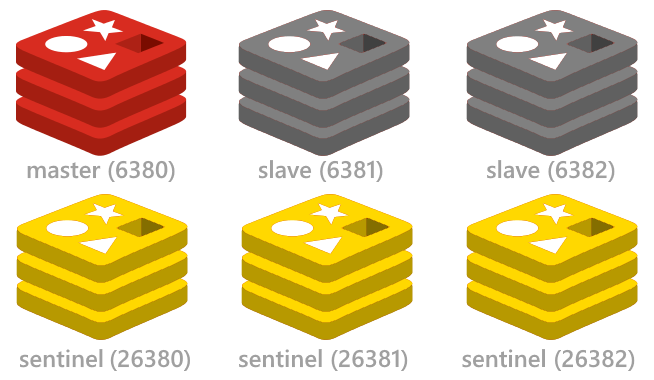
See the redis config project for a quick way to setup up the minimal highly available Redis Sentinel configuration including start/stop scripts for instantly running multiple redis instances on a single (or multiple) Windows, OSX or Linux servers.
You can use the RedisStats class for visibility and introspection into your running instances.
The Redis Stats wiki lists the stats available.
To improve the resilience of client connections, RedisClient will transparently retry failed
Redis operations due to Socket and I/O Exceptions in an exponential backoff starting from
10ms up until the RetryTimeout of 3000ms. These defaults can be tweaked with:
RedisConfig.DefaultRetryTimeout = 3000;
RedisConfig.BackOffMultiplier = 10;
ServiceStack.Redis now supporting SSL connections making it suitable for accessing remote Redis server instances over a secure SSL connection.

As connecting to Azure Redis Cache via SSL was the primary use-case for this feature, we've added a new Getting connected to Azure Redis via SSL to help you get started.
Most of the time when waiting to use a new Redis Command you'll need to wait for an updated version of ServiceStack.Redis to add support for the new commands likewise there are times when the Redis Client doesn't offer every permutation that redis-server supports.
With the new Custom and RawCommand API's on IRedisClient and IRedisNativeClient you can now use the RedisClient to send your own
custom commands that can call adhoc Redis commands:
public interface IRedisClient
{
    ...
    RedisText Custom(params object[] cmdWithArgs);
}

public interface IRedisNativeClient
{
    ...
    RedisData RawCommand(params object[] cmdWithArgs);
    RedisData RawCommand(params byte[][] cmdWithBinaryArgs);
}
These Custom API's take a flexible object[] arguments which accepts any serializable value e.g.
byte[], string, int as well as any user-defined Complex Types which are transparently serialized
as JSON and send across the wire as UTF-8 bytes.
var ret = Redis.Custom("SET", "foo", 1);          // ret.Text = "OK"

byte[] cmdSet = Commands.Set;
ret = Redis.Custom(cmdSet, "bar", "b");           // ret.Text = "OK"

ret = Redis.Custom("GET", "foo");                 // ret.Text = "1"
There are also
convenient extension methods
on RedisData and RedisText that make it easy to access structured data, e.g:
var ret = Redis.Custom(Commands.Keys, "*");
var keys = ret.GetResults();                      // keys = ["foo", "bar"]

ret = Redis.Custom(Commands.MGet, "foo", "bar");
var values = ret.GetResults();                    // values = ["1", "b"]

Enum.GetNames(typeof(DayOfWeek)).ToList()
    .ForEach(x => Redis.Custom(Commands.RPush, "DaysOfWeek", x));
ret = Redis.Custom(Commands.LRange, "DaysOfWeek", 1, -2);
var weekDays = ret.GetResults();

weekDays.PrintDump(); // ["Monday", "Tuesday", "Wednesday", "Thursday", "Friday"]
and some more examples using Complex Types with the Custom API's:
var ret = Redis.Custom(Commands.Set, "foo", new Poco { Name = "Bar" }); // ret.Text = "OK"

ret = Redis.Custom(Commands.Get, "foo");          // ret.Text =  {"Name":"Bar"}
Poco dto = ret.GetResult<Poco>();

dto.Name.Print(); // Bar
This API is used in most of Redis React UI's redis.js JavaScript client library where Redis server commands are made available via the single ServiceStack Service:
public object Any(CallRedis request)
{
    var args = request.Args.ToArray();
    var response = new CallRedisResponse { Result = Redis.Custom(args) };
    return response;
}The Pub/Sub engine powering Redis ServerEvents and Redis MQ has been extracted and encapsulated it into a re-usable class that can be used independently for handling messages published to specific Redis Pub/Sub channels.
RedisPubSubServer processes messages in a managed background thread that automatically reconnects
when the redis-server connection fails and works like an independent background Service that can be
stopped and started on command.
The public API is captured in the IRedisPubSubServer interface:
public interface IRedisPubSubServer : IDisposable
{
    IRedisClientsManager ClientsManager { get; }
    // What Channels it's subscribed to
    string[] Channels { get; }

    // Run once on initial StartUp
    Action OnInit { get; set; }
    // Called each time a new Connection is Started
    Action OnStart { get; set; }
    // Invoked when Connection is broken or Stopped
    Action OnStop { get; set; }
    // Invoked after Dispose()
    Action OnDispose { get; set; }

    // Fired when each message is received
    Action<string, string> OnMessage { get; set; }
    // Fired after successfully subscribing to the specified channels
    Action<string> OnUnSubscribe { get; set; }
    // Called when an exception occurs
    Action<Exception> OnError { get; set; }
    // Called before attempting to Failover to a new redis master
    Action<IRedisPubSubServer> OnFailover { get; set; }

    int? KeepAliveRetryAfterMs { get; set; }
    // The Current Time for RedisServer
    DateTime CurrentServerTime { get; }

    // Current Status: Starting, Started, Stopping, Stopped, Disposed
    string GetStatus();
    // Different life-cycle stats
    string GetStatsDescription();

    // Subscribe to specified Channels and listening for new messages
    IRedisPubSubServer Start();
    // Close active Connection and stop running background thread
    void Stop();
    // Stop than Start
    void Restart();
}To use RedisPubSubServer, initialize it with the channels you want to subscribe to and assign handlers
for each of the events you want to handle. At a minimum you'll want to handle OnMessage:
var clientsManager = new PooledRedisClientManager();
var redisPubSub = new RedisPubSubServer(clientsManager, "channel-1", "channel-2") {
        OnMessage = (channel, msg) => "Received '{0}' from '{1}'".Print(msg, channel)
    }.Start();
Calling Start() after it's initialized will get it to start listening and processing any messages
published to the subscribed channels.
The new ZRANGEBYLEX sorted set operations allowing you to query a sorted set lexically have been added. A good showcase for this is available on autocomplete.redis.io.
These new operations are available as a 1:1 mapping with redis-server on IRedisNativeClient:
public interface IRedisNativeClient
{
    ...
    byte[][] ZRangeByLex(string setId, string min, string max, int? skip, int? take);
    long ZLexCount(string setId, string min, string max);
    long ZRemRangeByLex(string setId, string min, string max);
}
And the more user-friendly APIs under IRedisClient:
public interface IRedisClient
{
    ...
    List<string> SearchSortedSet(string setId, string start=null, string end=null);
    long SearchSortedSetCount(string setId, string start=null, string end=null);
    long RemoveRangeFromSortedSetBySearch(string setId, string start=null, string end=null);
}
Just like NuGet version matchers, Redis uses [ char to express inclusiveness and ( char for exclusiveness.
Since the IRedisClient APIs defaults to inclusive searches, these two APIs are the same:
Redis.SearchSortedSetCount("zset", "a", "c")
Redis.SearchSortedSetCount("zset", "[a", "[c")
Alternatively you can specify one or both bounds to be exclusive by using the ( prefix, e.g:
Redis.SearchSortedSetCount("zset", "a", "(c")
Redis.SearchSortedSetCount("zset", "(a", "(c")
More API examples are available in LexTests.cs.
The development branch of Redis server (available when v3.0 is released) includes an ingenious algorithm to approximate the unique elements in a set with maximum space and time efficiency. For details about how it works see Redis's creator Salvatore's blog who explains it in great detail. Essentially it lets you maintain an efficient way to count and merge unique elements in a set without having to store its elements. A Simple example of it in action:
redis.AddToHyperLog("set1", "a", "b", "c");
redis.AddToHyperLog("set1", "c", "d");
var count = redis.CountHyperLog("set1"); //4

redis.AddToHyperLog("set2", "c", "d", "e", "f");

redis.MergeHyperLogs("mergedset", "set1", "set2");

var mergeCount = redis.CountHyperLog("mergedset"); //6Redis v2.8 introduced a beautiful new SCAN operation that provides an optimal strategy for traversing a redis instance entire keyset in managable-size chunks utilizing only a client-side cursor and without introducing any server state. It's a higher performance alternative and should be used instead of KEYS in application code. SCAN and its related operations for traversing members of Sets, Sorted Sets and Hashes are now available in the Redis Client in the following API's:
public interface IRedisClient
{
    ...
    IEnumerable<string> ScanAllKeys(string pattern = null, int pageSize = 1000);
    IEnumerable<string> ScanAllSetItems(string setId, string pattern = null, int pageSize = 1000);
    IEnumerable<KeyValuePair<string, double>> ScanAllSortedSetItems(string setId, string pattern = null, int pageSize = 1000);
    IEnumerable<KeyValuePair<string, string>> ScanAllHashEntries(string hashId, string pattern = null, int pageSize = 1000);
}

//Low-level API
public interface IRedisNativeClient
{
    ...
    ScanResult Scan(ulong cursor, int count = 10, string match = null);
    ScanResult SScan(string setId, ulong cursor, int count = 10, string match = null);
    ScanResult ZScan(string setId, ulong cursor, int count = 10, string match = null);
    ScanResult HScan(string hashId, ulong cursor, int count = 10, string match = null);
}
The IRedisClient provides a higher-level API that abstracts away the client cursor to expose a lazy Enumerable sequence to provide an optimal way to stream scanned results that integrates nicely with LINQ, e.g:
var scanUsers = Redis.ScanAllKeys("urn:User:*");
var sampleUsers = scanUsers.Take(10000).ToList(); //Stop after retrieving 10000 user keys The C# API below returns the first 10 results matching the key:* pattern:
var keys = Redis.ScanAllKeys(pattern: "key:*", pageSize: 10)
    .Take(10).ToList();
However the C# Streaming API above requires an unknown number of Redis Operations (bounded to the number of keys in Redis)
to complete the request. The number of SCAN calls can be reduced by choosing a higher pageSize to tell Redis to scan more keys
each time the SCAN operation is called.
As the number of API calls has the potential to result in a large number of Redis Operations, it can end up yielding an unacceptable delay due to the latency of multiple dependent remote network calls. An easy solution is to instead have the multiple SCAN calls performed in-process on the Redis Server, eliminating the network latency of multiple SCAN calls, e.g:
const string FastScanScript = @"
local limit = tonumber(ARGV[2])
local pattern = ARGV[1]
local cursor = 0
local len = 0
local results = {}
repeat
    local r = redis.call('scan', cursor, 'MATCH', pattern, 'COUNT', limit)
    cursor = tonumber(r[1])
    for k,v in ipairs(r[2]) do
        table.insert(results, v)
        len = len + 1
        if len == limit then break end
    end
until cursor == 0 or len == limit
return results";

RedisText r = redis.ExecLua(FastScanScript, "key:*", "10");
r.Children.Count.Print() //= 10
The ExecLua API returns this complex LUA table response in the Children collection of the RedisText Response.
