
Avoid merge conflicts across git worktrees for parallel AI coding agents
Clash is an open-source CLI tool that helps avoid merge conflicts across git worktrees.
It's designed for developers running multiple AI coding agents (Claude Code, Codex, Cursor, etc.) in parallel — helping them identify potential conflicts early in the development process so they can work around them before it's too late.


- Problem Statement
- Clash - The Saviour
- Quick Start
- Core Features
- Example: Multi-Agent Workflow
- How It Works
- Use Cases
- Architecture
- Contributing
- FAQ
AI coding agents like Claude Code have transformed software development as we know it. Developers now run 3-6+ agents simultaneously, each working on a different feature/bug fix. The recommended approach put forward by most frontier labs is to isolate each agent in its own git worktree — essentially a separate working directory with its own branch.
When multiple AI agents (or developers) work in separate worktrees, they're blind to each other's changes and inevitably touch overlapping parts of the codebase. Conflicts only surface at feature completion, often after significant work and time is wasted. Current tools only catch these conflicts later down the line — we can do better by detecting them earlier in the process.
Clash surfaces worktree-to-worktree conflicts early, so you and your agents can be aware of overlapping changes and act on them before it's too late.
Real quotes from developers:
"Now you have created the fun new ability to create merge conflicts with yourself." — GitButler Blog
"I now know to expect potential conflicts. This happened to me recently, which was a big learning moment." — Developer on Medium
"If conflicts look tricky, I throw away the work." — Developer workflow description
Clash detects merge conflicts between all worktree pairs during development, helping you/agent:
- Guard file writes via hooks — automatic conflict check before every AI agent edit
- See conflicts instantly across all active worktrees
- Visualize conflict matrix showing which branches conflict
- Monitor in real-time as files change
- Integrate with AI agents via Claude Code hooks, CLAUDE.md instructions, or JSON output
Hook integration — Clash automatically detects conflicts before Claude Code writes a file. A single line in your settings and every file edit is guarded — no prompts to remember, no commands to run:
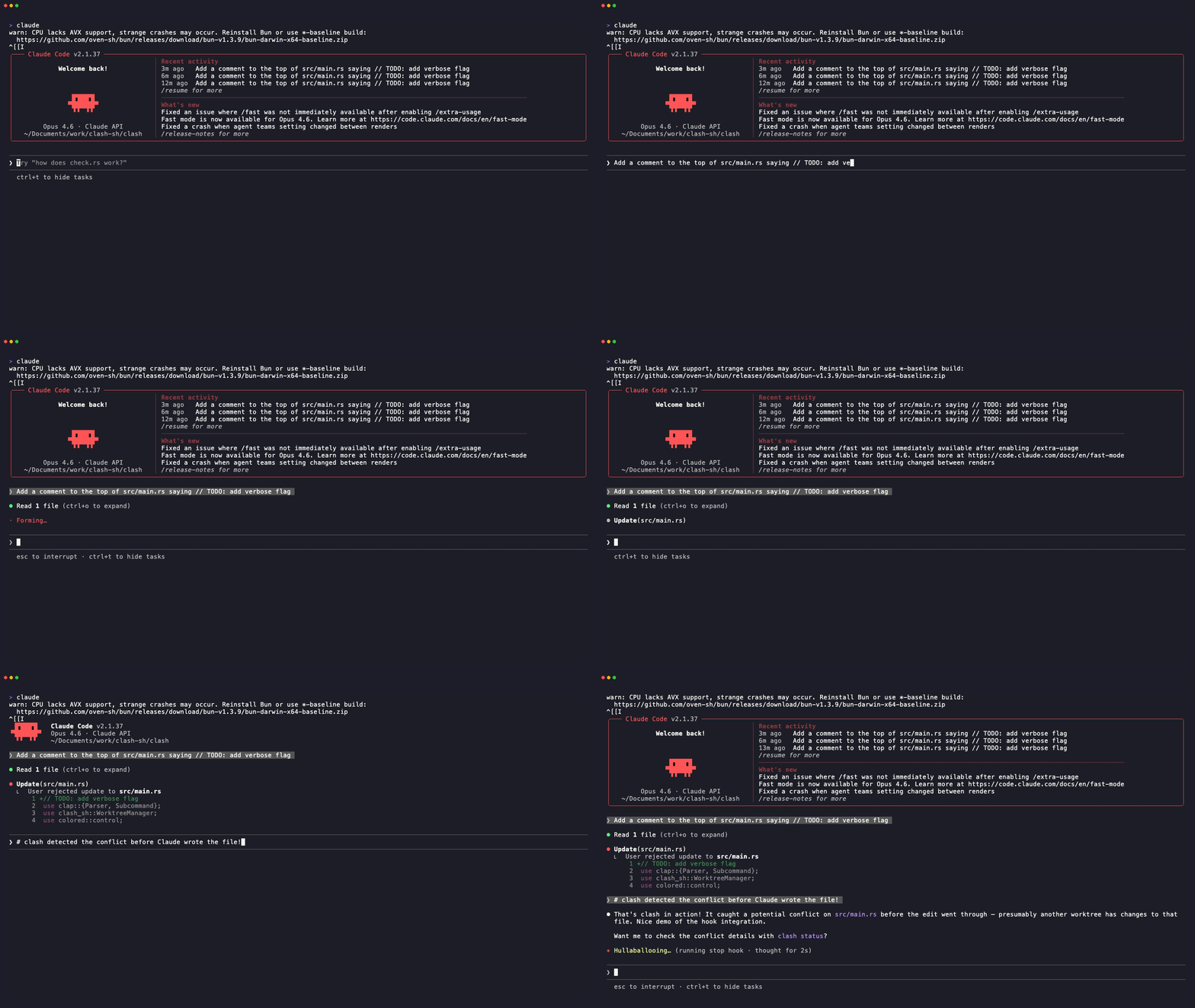
Automatic conflict detection — Clash prompts you before a conflicting edit goes through
Conflict warning in action — When a file has conflicts with multiple worktrees, Clash surfaces a clear warning so you can coordinate:
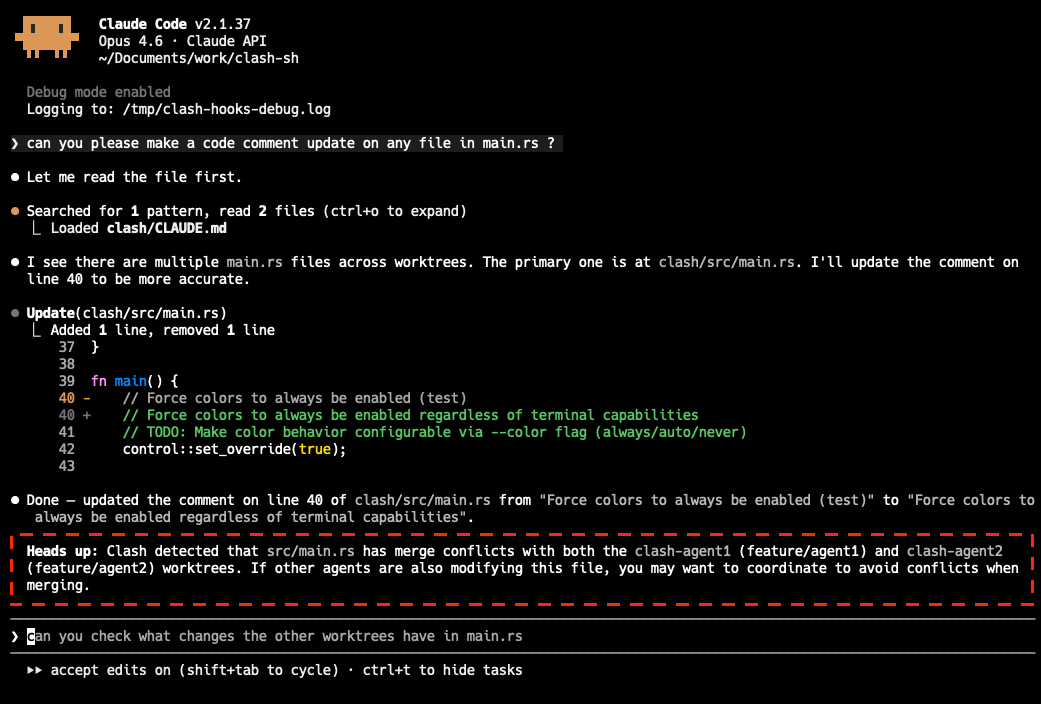
CLI usage — Ask your agent to use Clash directly for a full conflict overview:
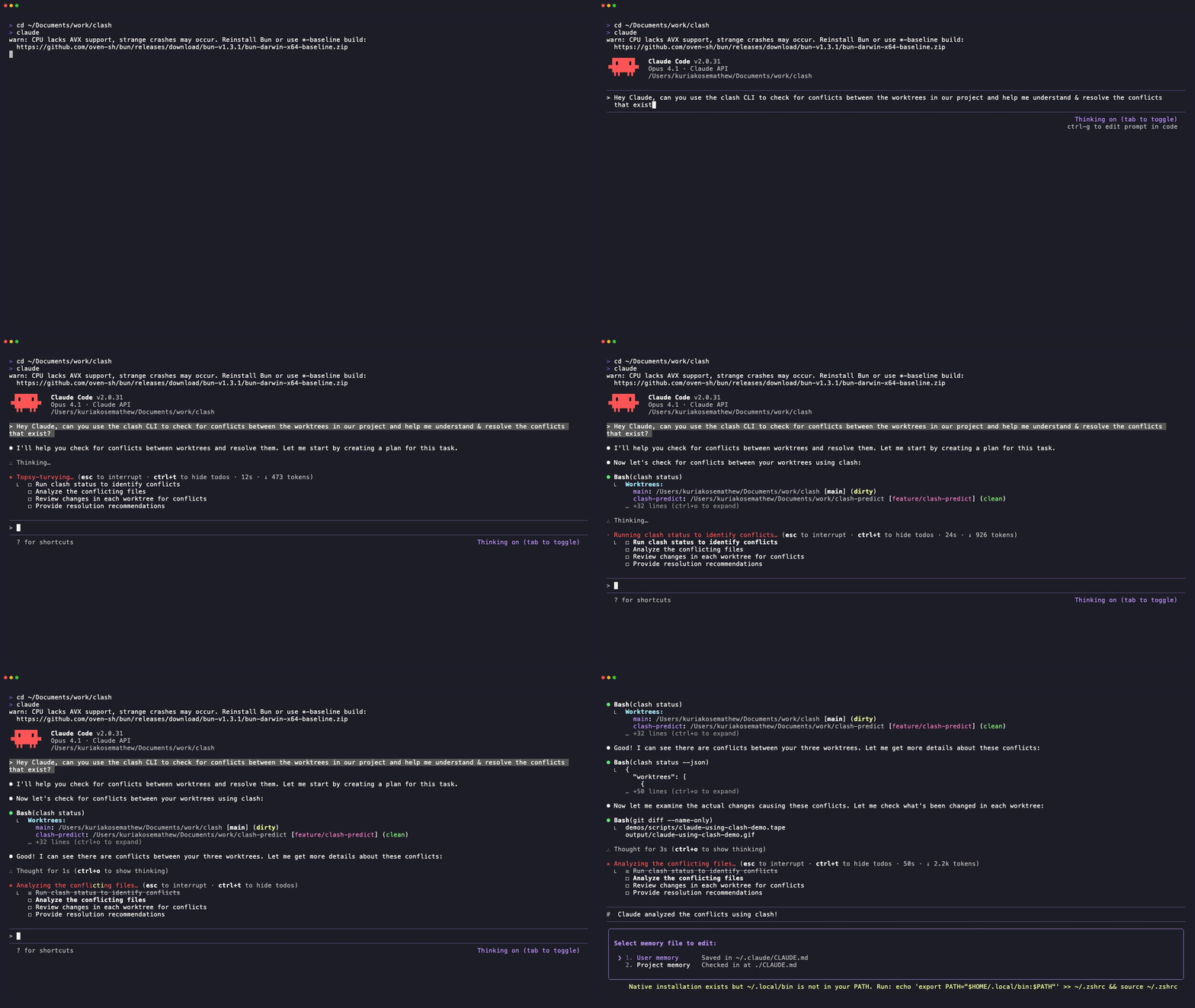
Clash alerts Claude Code to conflicts in another worktree, enabling smarter parallel development
Install Clash and the Claude plugin in one go:
curl -fsSL https://clash.sh/install.sh | sh && \
  claude plugin marketplace add clash-sh/clash && \
  claude plugin install clash@clash-sh
If clash is already installed, run plugin setup directly:
claude plugin marketplace add clash-sh/clash
claude plugin install clash@clash-sh
That's it. Clash will prompt you whenever Claude tries to edit a file that conflicts with another worktree.
Not using Claude Code? Install Clash manually:
curl -fsSL https://clash.sh/install.sh | sh    # Quick install (macOS/Linux)
brew tap clash-sh/tap && brew install clash    # Homebrew
cargo install clash-sh                         # From crates.io
Claude Code (Alternative: Manual hook setup)
Manual hook setup (without plugin)
If you prefer not to use the plugin, add the hooks key to your .claude/settings.json:
{
  "hooks": {
    "PreToolUse": [
      {
        "matcher": "Write|Edit|MultiEdit",
        "hooks": [{ "type": "command", "command": "clash check" }]
      }
    ]
  }
}
Codex / Cursor / Windsurf / Other Agents (Manual)
If hooks aren't available, add to your project instructions (e.g. .claude/instructions.md, .cursorrules):
IMPORTANT: Before editing any file, run `clash check <file>` to check for merge conflicts
with other worktrees. If conflicts are detected, examine the conflicting files and adapt
your approach to avoid or minimize them.

Run `clash status` periodically (especially before and after commits) to get a full
conflict overview across all worktrees.

Run `clash --help` for all available commands.# Check a single file for conflicts
clash check src/main.rs
# Check conflicts across all worktrees
clash status
# Output as JSON for scripts/agents
clash status --json
# Watch for conflicts in real-time
clash watch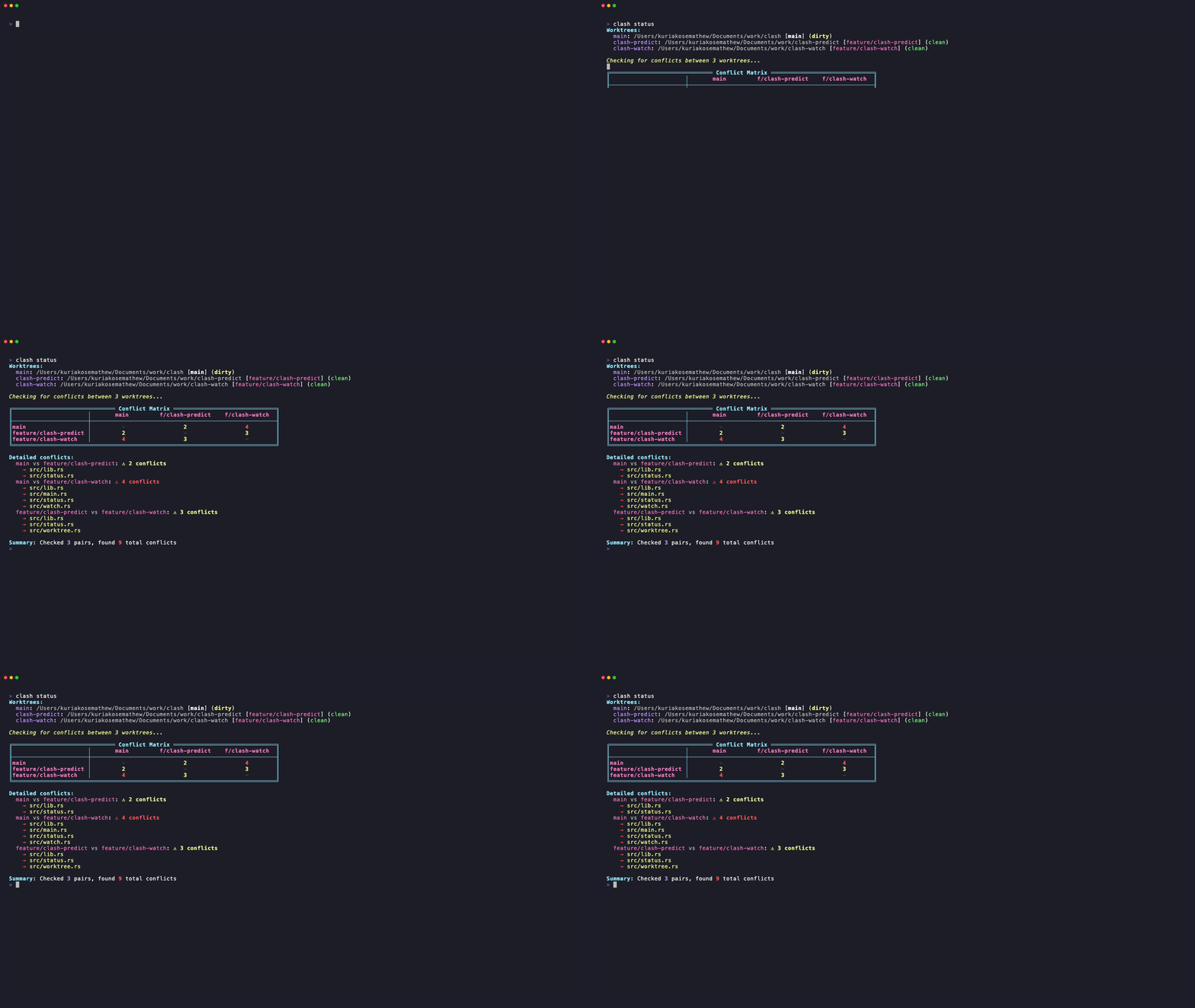
The best way to use Clash with Claude Code — automatic conflict detection before every file write, zero ongoing effort.
claude plugin marketplace add clash-sh/clash
claude plugin install clash@clash-sh
Or manually add the hook to your .claude/settings.json:
{
  "hooks": {
    "PreToolUse": [
      {
        "matcher": "Write|Edit|MultiEdit",
        "hooks": [{ "type": "command", "command": "clash check" }]
      }
    ]
  }
}
When Claude tries to write or edit a file, Clash automatically:
- Reads the target file path from the hook's stdin
- Checks it for conflicts across all worktrees
- If conflicts are found, prompts you with an "ask" decision — you can approve or deny the edit
Clash detects a conflict before Claude writes the file, giving you a chance to intervene
Note: Claude Code currently doesn't display the
permissionDecisionReasonin the prompt UI (anthropics/claude-code#24059). You'll see the permission prompt but not the conflict details. As a workaround, you can runclash check <file>manually to see full details.
You can also run clash check manually to check a single file for conflicts across all worktrees:
clash check src/main.rs{
"file": "src/main.rs",
"current_worktree": "main",
"current_branch": "main",
"conflicts": [
{
"worktree": "clash-agent1",
"branch": "feature/auth",
"has_merge_conflict": true,
"has_active_changes": false
}
]
}Exit codes: 0 = no conflicts, 2 = conflicts found, 1 = error.
Shows a beautiful conflict matrix for all worktree pairs:
╔════════════ Conflict Matrix ════════════╗
║            │ main  feat/a  feat/b  feat/c║
╟────────────┼─────────────────────────────╢
║main        │  -     OK      OK      OK   ║
║feature/a   │  OK     -      2       1    ║
║feature/b   │  OK     2      -       3    ║
║feature/c   │  OK     1      3       -    ║
╚══════════════════════════════════════════╝
Numbers indicate conflicting files. "OK" means no conflicts.
Live TUI monitoring with automatic refresh on file changes:
# Shows worktree status and conflict updates in real-time
clash watch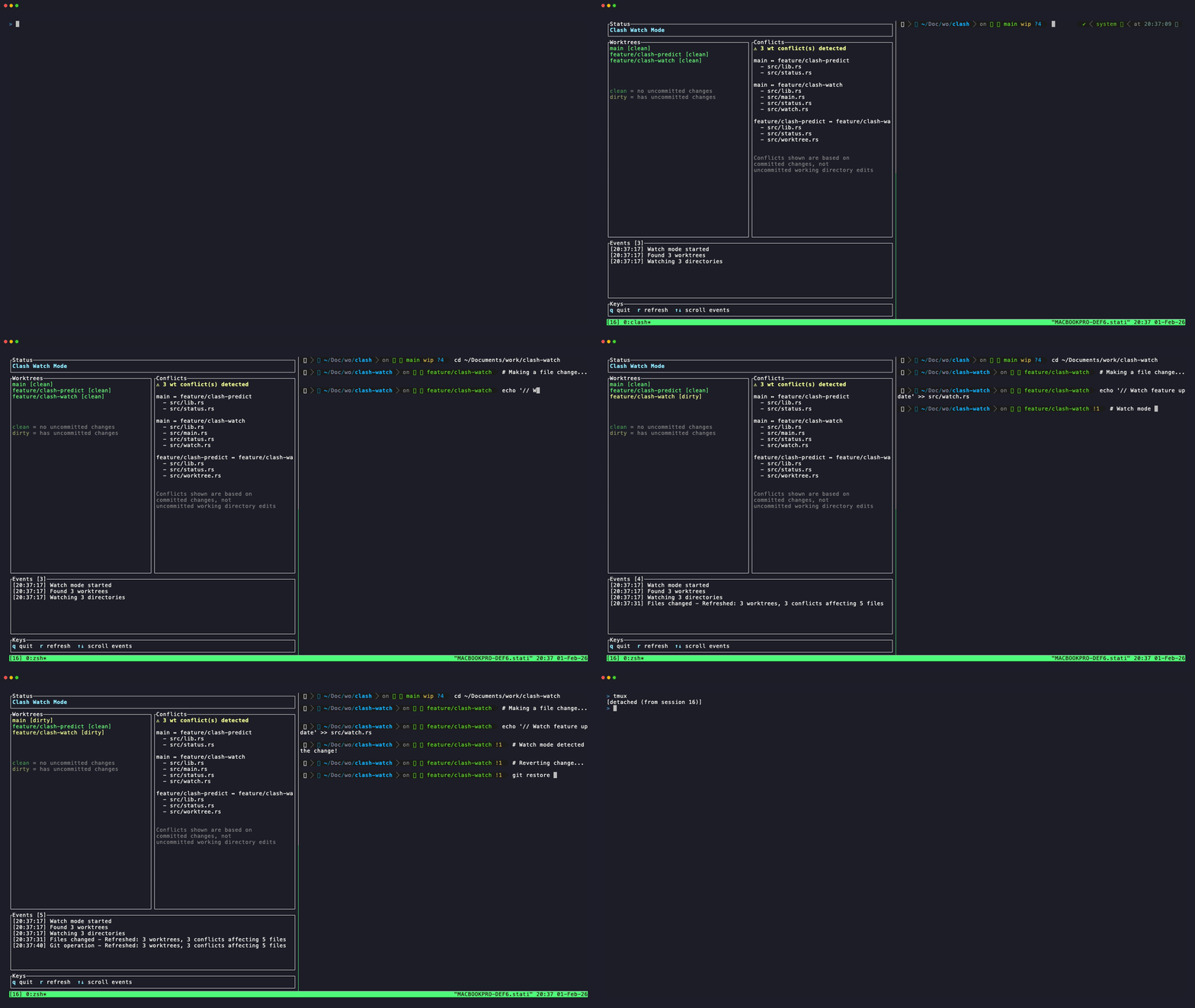
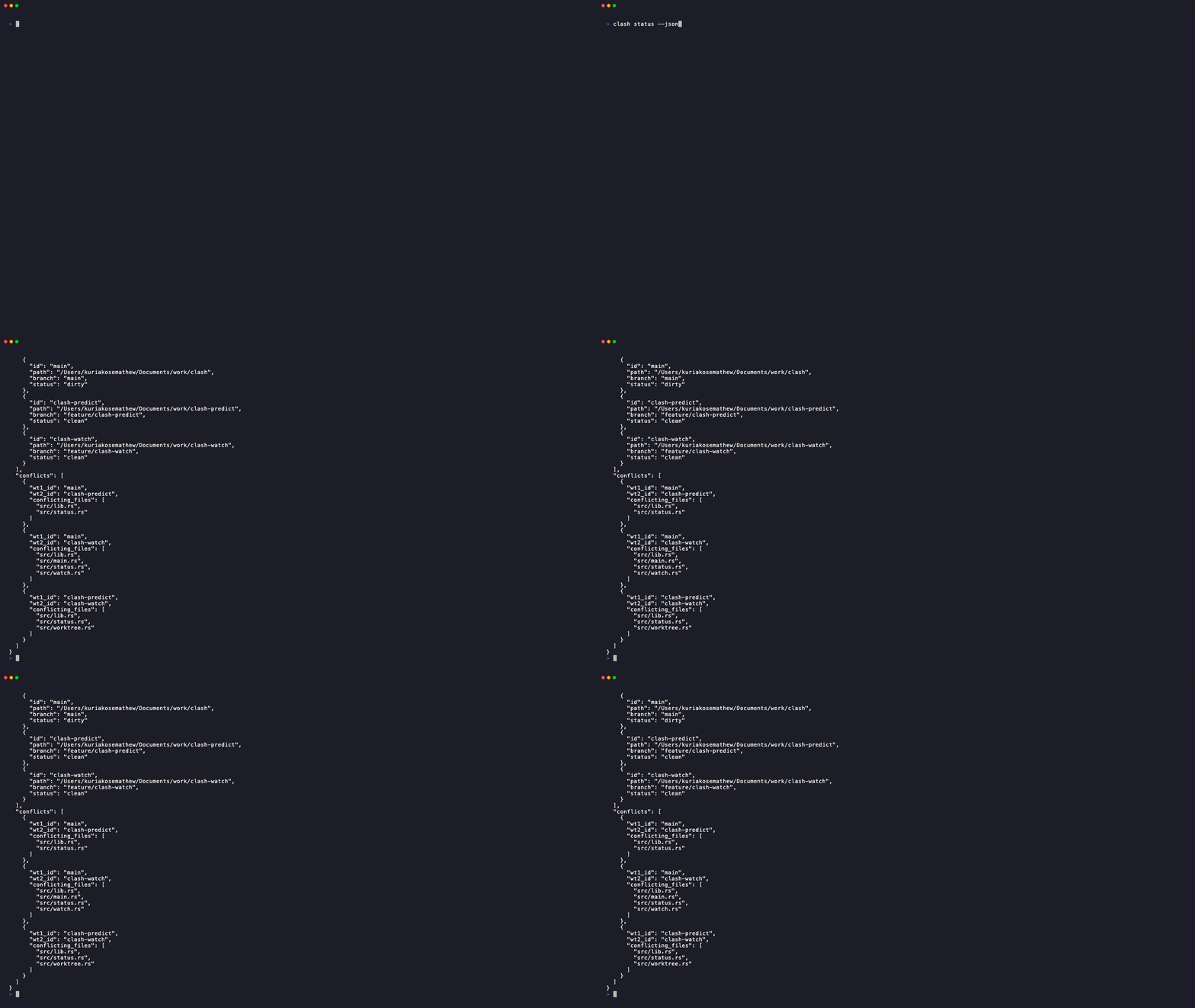
Machine-readable output for CI/CD and AI agents:
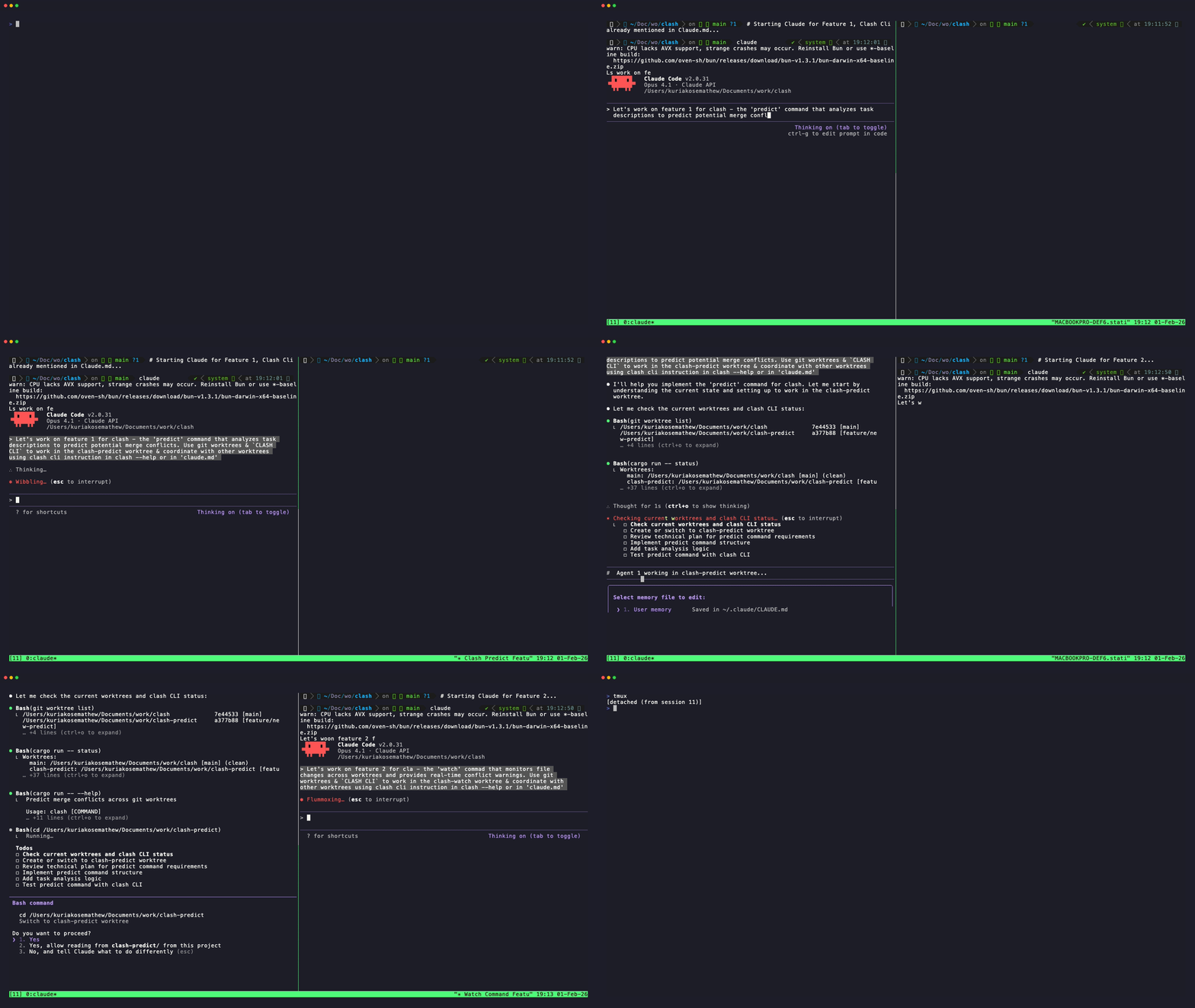
Coordinating multiple AI agents across worktrees - each agent works independently while using Clash for monitoring for conflicts
Clash uses git merge-tree (via the gix library) to perform three-way merges between worktree pairs without modifying your repository. It:
- Discovers all worktrees (main + linked)
- Finds the merge base for each pair
- Simulates the merge to detect conflicts
- Reports conflicting files
This is 100% read-only — your repository is never modified.
Prevent wasted compute when agents' work conflicts:
# Check before expensive operations
if clash status --json | jq -e '.conflicts | length > 0'; then
  echo "Conflicts detected! Replan agent tasks"
fiSee what your teammates are changing before you merge:
# Add to git pre-merge hook
clash status || echo "Warning: Conflicts detected!"Fail fast when feature branches conflict:
- name: Check for conflicts
  run: |
    cargo install clash
    clash status --json > conflicts.json
jq -e '.conflicts | length == 0' conflicts.jsonClash is written in Rust for speed and reliability:
| Crate | Purpose |
|---|---|
| gix | Git operations without shelling out |
| ratatui | Terminal UI framework |
| notify | File system watching |
| serde | JSON serialization |
Single binary, no runtime dependencies. Works anywhere git works.
We really appreciate all contributions big or small!
- ⭐ Star the repo — helps others discover Clash
- 🗣️ Tell a friend about Clash
- 📝 Open an issue — feedback, feature requests, even small friction points or confusing messages, or AI agent coordination pain not yet solved
- 📢 Share: X · Reddit · LinkedIn
See CONTRIBUTING.md for some more details.
Q: Does Clash modify my repository? A: Never. Clash is 100% read-only. It simulates merges in memory.
Q: Can it resolve conflicts? A: Not yet — Clash detects conflicts. Resolution suggestions may come in a future version. In the meantime, your AI agent can act on the conflict information directly.
MIT - See LICENSE file for details.
Built with Love, Rust & Claude.
Special thanks to the Rust community for incredible libraries that made this possible.